

Introduction
Burq webhooks allow you to receive real-time updates when events occur across your deliveries, routes, and orders, without polling the API.
You can configure multiple webhook URLs, each subscribed to a specific set of event types. For example, one URL can receive delivery status updates while another receives route dispatch events.
Setup
Go to the Developer section of the Burq Dashboard to manage your webhooks.
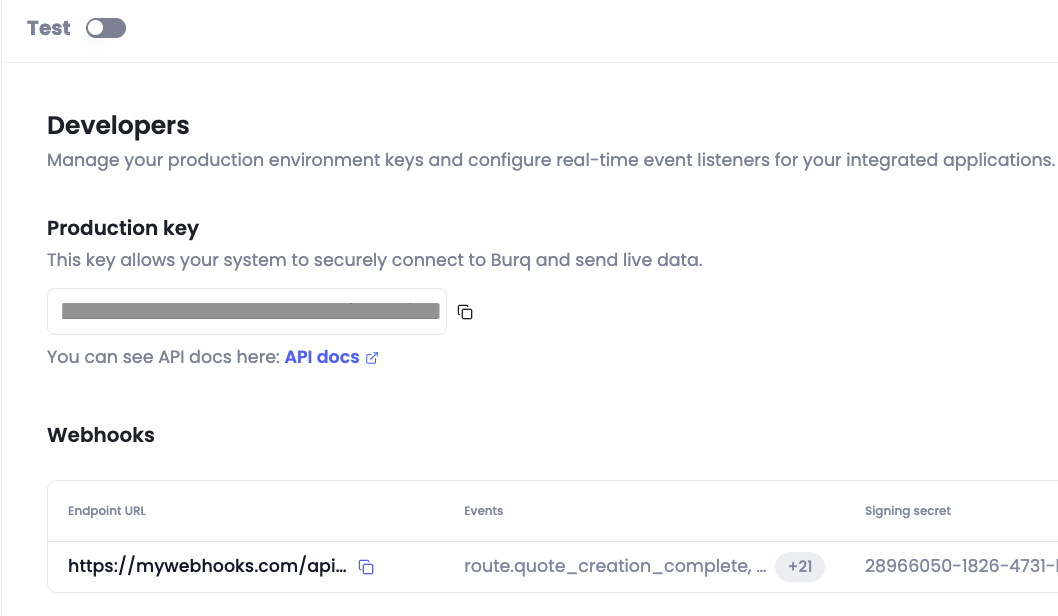
Click Add Webhook, enter your endpoint URL, and select the event types you want to receive. A single URL can subscribe to any combination of events, and the same event can be sent to multiple URLs.
Webhook URLs are configured separately for production and test environments — use the environment toggle at the top of the screen to make sure you're configuring the right one.
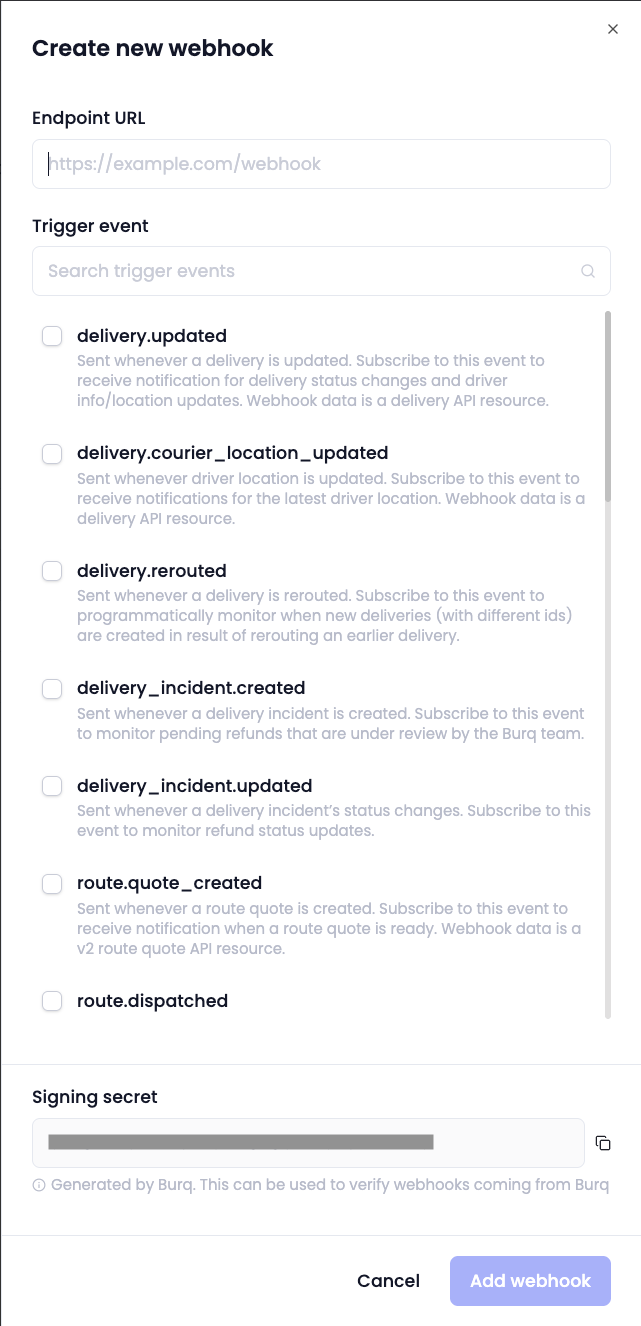
Event Types
Delivery Events
| Event | Description |
|---|---|
delivery.updated | Fired when a delivery status changes, or when pickup_eta or dropoff_eta updates, or when item barcode is scanned. |
delivery.courier_location_updated | Fired when Burq receives a driver location update from a provider. |
delivery.rerouted | Fired when a delivery is rerouted to a different provider. |
delivery_incident.created | Fired when a delivery incident (e.g. cancellation, dispute) is created. |
delivery_incident.updated | Fired when a delivery incident is updated. |
Route Events
| Event | Description |
|---|---|
route.quote_creation_started | Fired when quote generation begins for a route. |
route.quote_creation_complete | Fired when quotes are ready for a route. |
route.quote_creation_failed | Fired when quote generation fails. |
route.quote_created | Fired when an individual route quote is created. |
route.dispatched | Fired when a route dispatch completes — successfully or not. Check the success field before treating it as a success. |
route.updated | Fired when a route status changes. |
route.canceled | Fired when an asynchronous route cancellation completes — successfully or not. Check the success field. |
Batch Events
| Event | Description |
|---|---|
batch.order_creation_started | Fired when batch order creation begins. |
batch.order_creation_complete | Fired when batch orders are successfully created. |
batch.order_creation_failed | Fired when batch order creation fails. |
batch.route_creation_started | Fired when batch route creation begins. |
batch.route_creation_complete | Fired when batch routes are successfully created. |
batch.route_creation_failed | Fired when batch route creation fails. |
batch.quote_creation_started | Fired when batch quote generation begins. |
batch.quote_creation_complete | Fired when batch quotes are ready. |
batch.quote_creation_failed | Fired when batch quote generation fails. |
batch.vehicle_recommendation_started | Fired when vehicle recommendation begins for a batch. |
batch.vehicle_recommendation_complete | Fired when vehicle recommendation completes. |
batch.vehicle_recommendation_failed | Fired when vehicle recommendation fails. |
Webhook Request Payload
All webhook events share the same top-level envelope:
{
  "object": "event",
  "type": "delivery.updated",
  "data": {
    // Event-specific payload
  }
}
For delivery events, the data object is a Delivery resource. You can find full property documentation in Creating Delivery Requests.
The status_history field on the Delivery resource records each status transition with its timestamp:
"status_history": [
  { "status": "delivery_created", "created": "2022-11-26T19:05:24.000Z" },
  { "status": "driver_assigned", "created": "2022-11-26T19:05:34.000Z" },
  { "status": "enroute_pickup", "created": "2022-11-26T19:05:38.000Z" },
  { "status": "arrived_at_pickup", "created": "2022-11-26T19:15:49.000Z" },
  { "status": "pickup_complete", "created": "2022-11-26T19:16:00.000Z" },
  { "status": "enroute_dropoff", "created": "2022-11-26T19:21:00.000Z" },
  { "status": "arrived_at_dropoff", "created": "2022-11-26T19:40:00.000Z" },
  { "status": "delivered", "created": "2022-11-26T19:41:00.000Z" }
]
item barcode scanning events on the Delivery resource are nested inside item object:
"items": [
      {
        "name": "Oven",
        // rest of items data
        "barcode": {
          "barcode": "0065873427126",
          "scanned_at_pickup": "2026-08-14T13:39:17.882Z",
          "scanned_at_dropoff": "2026-08-14T13:40:17.883Z"
        }
      }
    ]
delivery.rerouted
When a delivery is rerouted, Burq cancels the original and creates a new delivery with a new ID — future updates will only be sent under the new delivery ID. The payload includes both:
{
  "object": "event",
  "type": "delivery.rerouted",
  "data": {
    "parent_delivery": {
      // Original Delivery resource
    },
    "child_delivery": {
      // New Delivery resource
    }
  }
}
delivery_incident.created / delivery_incident.updated
The data object is a Delivery Incident resource — see GET Delivery Incident for the full schema.
Handling Events
Terminal — the operation is over, no further event is coming
| Event | Condition | What it means |
|---|---|---|
route.dispatched | success: false | Dispatch failed. The route is failed and no deliveries are live. Inspect the error object. Re-dispatching requires a new quote. |
route.dispatched | success: true | Dispatch succeeded for at least one order. Track progress per delivery via delivery.updated from here. |
route.canceled | success: false | Cancellation failed. The route is not canceled and its deliveries may still be live. Inspect error and retry or escalate. |
route.canceled | success: true | The route and its deliveries are canceled. Expect a matching terminal delivery.updated per delivery. |
route.quote_creation_failed | — | No quotes were produced. The route cannot be dispatched as-is. |
batch.order_creation_failed | — | No orders were created from the batch. |
batch.route_creation_failed | — | Only fires when auto_route: true. Orders may still exist; routes do not. |
batch.quote_creation_failed | — | Only fires when auto_quote: true. |
batch.vehicle_recommendation_failed | — | Only fires when recommend_vehicle: true. |
delivery.updated | status is delivered or disputed | The delivery was fulfilled. |
delivery.updated | status is provider_canceled, customer_canceled, burq_canceled, or failed and reroute.reroute_status is not_reroutable, disabled_for_account, or not_applicable | The delivery is canceled and will not resume. When not_reroutable, reroute.not_rerouted_reason explains why. |
delivery.rerouted | — | Terminal for parent_delivery.id only. All future events arrive under child_delivery.id |
delivery_incident.created | Follows a provider_canceled delivery | Always raised when a provider cancels. Not raised for most merchant-initiated cancellations. |
Non-terminal — cancelled, but Burq is still working the order
A cancelled delivery status does not mean the order has failed. Any cancel status — provider_canceled, burq_canceled, or customer_canceled — can be the first step of a reroute. Always check reroute.reroute_status before treating a cancellation as final.
| Event | Condition | What it means |
|---|---|---|
delivery.updated | reroute.reroute_status is provider_search | Burq is sourcing a replacement provider. Do not surface this as a failure. Wait for either delivery.rerouted, or a follow-up delivery.updated moving the status to not_reroutable. |
delivery.updated | reroute.reroute_status is rerouted | A replacement delivery exists. Follow reroute.new_delivery_id, or subscribe to delivery.rerouted to receive both deliveries in one payload. |
Progress events - events which are sent for progress tracking
| Event | What it means |
|---|---|
route.quote_creation_started | Progress ping. The matching _complete / _failed event is authoritative. |
batch.order_creation_started | Progress ping. The matching _complete / _failed event is authoritative. |
batch.route_creation_started | Progress ping. The matching _complete / _failed event is authoritative. |
batch.quote_creation_started | Progress ping. The matching _complete / _failed event is authoritative. |
batch.vehicle_recommendation_started | Progress ping. The matching _complete / _failed event is authoritative. |
route.quote_created | Emitted per individual quote. The full set arrives in route.quote_creation_complete. Handle it only if you want to display quotes as they stream in. |
route.updated | A route-level rollup that is fully derivable from the per-delivery events, and it is not guaranteed to be sent. Never block logic on receiving it. |
delivery.courier_location_updated | The highest-volume event by a wide margin. Ignore it unless you render a live driver map. |
delivery.updated | When status matches the last status you recorded. These are ETA-only, location-only or item barcode scanning-only refreshes, not state transitions. |
Webhook Security
Each webhook request includes a Burq-Signature header you can use to verify the request came from Burq:
Burq-Signature: t=1492774577,v1=5257a869e7ecebeda32affa62cdca3fa51cad7e77a0e56ff536d0ce8e108d8bdBurq signs requests using HMAC with SHA-256. Your signing secret is available in the Dashboard under Developer → Signing Secret. Each environment (production / test) has its own secret.
Step 1: Extract timestamp and signature
Split the header on ,, then split each part on = to get key-value pairs:
t→ timestampv1→ signature
Step 2: Construct the signed payload
Concatenate:
- The timestamp value
- A literal
. - The raw JSON request body
Step 3: Compute and compare
Compute HMAC-SHA256(payload, signingSecret) and compare it to the v1 value using a constant-time string comparison to prevent timing attacks.
As an additional check, compare the timestamp against the current time and reject requests that are too old.